Home / Questions / Opening an account
Opening a Binance account: how to be sure the page you are on is real
Nobody loses money because they could not work out which box the email address goes in. They lose it by filling in a perfect form on a site that was not the site.
- Check the platform serves your country before you fill in anything — including whether the referral programme is available where you are.
- Arrive at the site through your own bookmark or a verified app-store listing. Never through a search advertisement or a link somebody sent you.
- Set up phishing-resistant two-factor authentication on day one, not the day something goes wrong.
- The referral code goes in during registration. It is optional, it changes your fees rather than your rights, and it cannot be added retroactively.
The form is the easy part. Nobody loses money because they could not work out which box the email address goes in — they lose it because they filled in a perfect form on a website that was not the website. Which makes the standard walkthrough, ten screenshots of fields you could have found on your own, a strange thing to spend a page on.
So this walkthrough is organised around the checks rather than the clicks. It uses Binance because that is the platform this site is set up for, and the referral code below is ours — that is disclosed here and everywhere else on the site. The verification habits transfer to any platform.
First: does this platform actually serve you?
Do this before you type anything, because it decides whether the rest is relevant.
Country of residence. Binance.com does not serve residents of the United States — there is a separate US platform, operated by a different company, and none of what follows applies to it. Other countries have their own restrictions, and platforms enter and leave markets more often than you would expect. The terms of service name the entity that would be serving you and the countries excluded.
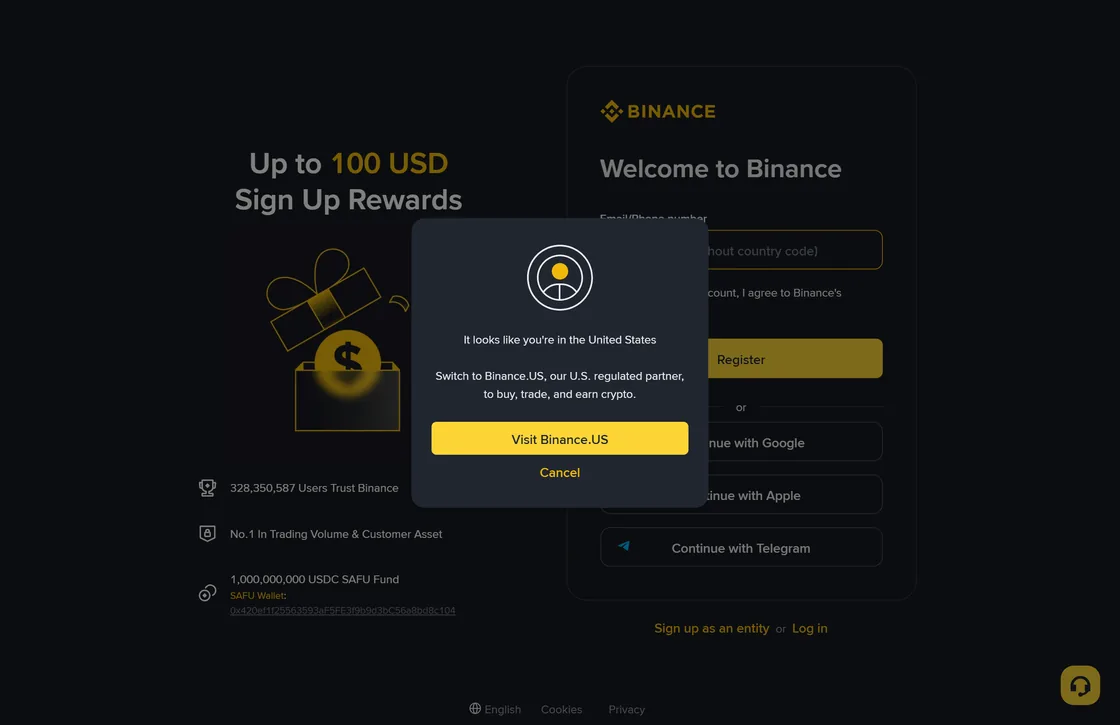
That dialog is the answer to the country question rendering itself in front of you, and it is worth knowing it exists before you start filling anything in. It does not appear for everyone; what it demonstrates is that the platform makes this determination and acts on it.
Referral programme eligibility, which is a different question. A platform can be perfectly available to you while its referral programme is not. As of the terms we checked in August 2026, users registered in the European Economic Area became ineligible to take part in the Binance referral programme in any capacity from 1 July 2026; Singapore residents have been excluded since 2022; Japan residents cannot participate as referred applicants; and Israel-based users are excluded. Those lists change, and the current version is on Binance's own referral terms page.
We would rather you found that out in the first ninety seconds than after registering with a code that could never have applied to you. If you are in one of those places, the account still works; the referral discount does not.
Getting to the real site — the step that carefulness later cannot fix
Every other security measure on this page assumes you are on the genuine site. If you are not, a strong password is a strong password handed to a stranger.
There are exactly two arrival routes worth using:
- A bookmark you made once, carefully, and use every time afterwards. Make it while calm, verify it once, then never type the address again.
- An app installed from the official store listing, where you checked the developer name on the listing rather than the app's own name. Fake apps copy the name and icon; the developer field is harder to fake and easier to check.
And the routes that account for most of the damage: search advertisements at the top of results, links in direct messages and emails, and links posted under social media threads about the platform. A sponsored result at the top of a search page has been bought, not verified.
Read it right to left. Look at the part before the first slash and take off the ending (.com, or a two-part ending such as .com.br or .co.uk): the name immediately left of that ending is the real domain, and everything before it is a subdomain that anybody can create. accounts.binance.com/register is Binance. binance.com.secure-login.net is secure-login.net, and the "binance.com" part is decoration. Also worth internalising: the padlock icon means the connection is encrypted, not that the company is genuine. Fraudulent sites have padlocks. They are free.
Our official source checklist turns this into a short list you can run once and be done with, including the app-store developer check and how to confirm a support channel is genuine.
The form itself, and the things nobody should ever ask for
Registration asks for an email address or phone number and a password. That is genuinely it at this stage.
A few decisions inside that small form are worth making deliberately:
- Use an email address you control and can still access in five years. Account recovery runs through it. A work address you might lose is a bad choice for the same reason a work address is a bad choice for anything personal.
- A unique password, generated rather than invented. If it resembles a password you use anywhere else, it is already in a breach database somewhere. A password manager solves this in one step and is worth the twenty minutes.
- The name you enter should match your identity document exactly. Not a shortened form, not a preferred spelling. Mismatched names are the single most common cause of withdrawals getting stuck later, and fixing it after the fact is a support ticket rather than an edit.
Now the list with no exceptions in it. Nobody legitimate — not support, not a regulator, not a "verification department", not a friend helping you set it up — will ever need:
- your password;
- a two-factor code, including a code you were told to read out to confirm your identity;
- a recovery or seed phrase for a wallet;
- remote access to your screen or device;
- a payment to activate, verify, or unfreeze your own account.
Every entry on that list is on it because it is a live technique, not a hypothetical. The reason to treat it as absolute rather than case-by-case is that these approaches arrive with good stories, and evaluating a good story under pressure is exactly what people are bad at.
Where the referral code goes and what it actually does
During registration there is a field for a referral ID or code — sometimes behind a small "referral code" toggle rather than shown by default. If you arrive through a referral link, it is usually filled in already. It is worth checking that it says what you expect before you continue, because it cannot be changed afterwards.
What the code does: it links your account to whoever referred you, and it routes a share of the trading fees you pay. It can also give you a discount on those fees — Binance's programme describes up to 20%, and the exact figure depends on the programme terms in force when you register.
What it does not do: it does not change your rights, your protections, your account type, your verification requirements, or the price at which you buy anything. It is a fee arrangement, nothing more. Anybody presenting a referral code as an exclusive tier, early access, or a bonus that requires a deposit to unlock is describing something other than a referral code.
The link below is our Binance referral link and carries our code, BN0112. If you register through it, Binance pays us a promotion service fee out of the trading fees you would already have paid, and you get up to 20% off those fees — whatever the referral page shows on the day. Under the terms in force it costs you no more than registering without a code, and it is the only referral link on this entire site.
Opens Binance in a new tab so this page stays where it is while you work through it. Prefer not to use a referral link at all? Type the address yourself and register without a code — everything else on this page works exactly the same, and we would rather you did that than click something you feel uneasy about. The exact discount and the eligibility rules are Binance's to set and change; see their referral terms, linked above.Identity verification: what they want, and why it stalls
Regulated platforms have to verify who you are. Expect a government photo identity document, a selfie or short liveness video, and sometimes a proof of address such as a utility bill or bank statement.
Two things are worth knowing in advance.
Do it before you need it. Verification queues lengthen exactly when markets are busy, which is exactly when people want to move money. Someone who verifies on a quiet Tuesday has a different experience from someone verifying during a panic.
The rejection reasons are mundane. Glare across the document. A corner cropped off. A name that does not match the account. An address document older than the accepted window — three months is a common cutoff. A screenshot rather than a photograph. None of these are judgements about you; they are checklist failures, and the checklist is the same everywhere.
People do get stuck at this stage, sometimes for days. If that is the part that worries you most, the realistic version of getting money back out afterwards — the routes, the requirements, the delays — is set out in its own file.
Two-factor authentication: the setting that decides whether phishing works on you
Set this up before you deposit anything. It is the highest-value ten minutes on this page.
Not all two-factor is equal:
| Method | Stops a stolen password | Stops a convincing fake site |
|---|---|---|
| SMS code | Yes | No — a fake site asks for the code and uses it immediately |
| Authenticator app | Yes | Partly — same relay attack works, but the attacker has a narrow time window |
| Security key or passkey | Yes | Yes — the key checks the domain, so it will not answer a lookalike site |
The third row is the meaningful difference. A hardware security key or a passkey cryptographically ties the login to the real domain, which means it simply does not respond on a fake one. Your carefulness is no longer the last line of defence.
Whichever you choose: save the backup codes somewhere offline, and set up two methods if the platform allows it. Losing access to your own two-factor is a slow, tedious recovery — better to spend the time now than to find out during a market you wanted to act in.
Funding the account: which method first, and why it matters
The deposit method is worth a moment's thought, because it determines how easily money comes back out and how likely your account is to be reviewed.
| Method | Speed in | What to know |
|---|---|---|
| Bank transfer from your own account | Hours to days | Usually the cheapest, and the cleanest for compliance because the name matches. Also the route back out, so testing it early tells you both directions work. |
| Card purchase | Instant | Convenient and typically the most expensive once the spread is counted. Some card issuers decline crypto transactions outright, and some treat them as cash advances. |
| Peer-to-peer | Minutes | Widely used where local bank rails are limited. Carries a specific risk: funds received from a counterparty can be traced to fraud and freeze your bank account. Trade only inside the platform's escrow. |
| Transfer from another platform | Minutes | Fine, but choose the network carefully and send a small test amount first. A transfer to the wrong network is generally unrecoverable. |
Two rules cover most of the trouble. Deposit from an account in your own name — third-party funding is a compliance flag on every regulated platform, and the review that follows is slow. And whatever the method, move a small amount first, both in and back out, before anything larger. The detail of that round trip is in the withdrawal file, and it is the check that actually proves the account works.
The ten-minute check once you are in
Run this list once, on the day you finish registering. It is not busywork; each item corresponds to a way people commonly lose access.
- Two-factor is on, and the backup codes are saved offline. Not in the same password manager you would be locked out of.
- A withdrawal address whitelist or anti-phishing code is enabled, if the platform offers it. These features exist because they work.
- Your name matches your bank account exactly. Third-party deposits and name mismatches are the usual reason a withdrawal is held.
- You have made one small test withdrawal. Before it matters. This is how you learn the real fee, the real delay, and whether a verification tier you did not know about is going to stop you.
- You know where the real support channel is — from inside the app, not from a search. Save it. The people who message you first are never support.
- You have decided how much of your money lives here. The answer for most people should be "as little as the activity requires". If you have not thought about the number, that question has its own page, and it is a better use of an hour than reading price predictions.
None of this makes buying cryptocurrency safe in the investment sense. You can do every step here perfectly and still lose money, because the asset can fall and there is no floor under it. This page is about not losing money to the avoidable failures — the fake site, the stolen code, the withdrawal you could not complete. Those are the ones that are actually within your control. Whether to do this at all is a separate question, and we wrote the case for not doing it too.
Registration questions we get repeatedly
- Can I add a referral code after I have already registered?
Generally no. The referral relationship is established at registration, and platforms do not usually attach one afterwards. If you already have an account and you were hoping to apply a code, the honest answer is that you have missed that window — opening a second account to get around it breaks the terms of nearly every exchange and risks both accounts.
- Does using a referral code cost me anything?
No. A referral code does not add a fee. It routes a share of the trading fees you would already have paid, and it can give you a discount on those fees — Binance describes up to 20% off, and the exact figure is whatever their referral page shows on the day you register. We are paid a promotion service fee when someone signs up with our code, which is disclosed here, in the footer, and on the disclosure page.
- Why does identity verification keep rejecting my document?
The three causes that account for most rejections are glare or blur on the document photo, a name that does not exactly match between the document and the account, and an expired document. Address proofs fail most often because the document is older than the accepted window, usually three months. Retry in daylight, with the document flat, and with the name typed exactly as it is printed.
- Is it safer to use the app or the website?
Both are fine if you reached them correctly, and that is the whole point. The app has one structural advantage: once it is installed from a verified store listing, you are no longer typing a domain each time, which removes the attack that catches most people. The website has the advantage that you can inspect the address and the certificate. Use either, but reach it the same way every time.
Last checked October 8, 2026. Spotted something wrong? Write to the desk — anything we get wrong ends up on the corrections page.